
Find what's broken before your visitors do
Site Audit opens every page at six screen sizes, from a small phone to a 2560 pixel monitor, and presses every button on it. Then it tells you what it found wrong. I built it after finding the same kinds of bugs by hand on my own site one too many times.
It's free and open source. Get it on GitHub, test pages included, so you can rerun the test below yourself.
What it found on this site
The home page of chronox.com.au, with its 3D hi-fi panel. The same audit, run before the fixes and again now.
| Measured | Before | Now |
|---|---|---|
| Failures | 2 | 0 |
| 3D draw calls a second with nothing moving | 46,471 | 0 |
| 3D draw calls a second while scrolled past it | 45,402 | 0 |
| Main thread busy with nobody touching the page | 74% | 6% |
| Graphics memory for the 3D, desktop | 135 MB | 112 MB |
A 3D scene that keeps drawing when nothing moves runs the graphics chip flat out for no change on screen. On a phone that is battery and heat. Now it draws only when something changes.
The test: a page built to fail
To prove it, I made the kind of landing page an AI tool turns out in a minute and planted the faults on purpose. The audit found 82 failures and 63 warnings across the six widths. After the rebuild it found no failures and one warning, and the first load went from 40 MB to 175 KB.

Text cut off by its card
Each card has a fixed height and hides what spills over, so the last lines just stop. It looks fine with short copy and breaks the day someone edits it. Caught at all six widths.

A picture stretched past its pixels
A 480 pixel image filling 1,100 pixels of screen. On a phone with a 3.5x screen it needed 1,269 and got 480. Next to it, a 4,000 pixel team photo shown 300 wide.
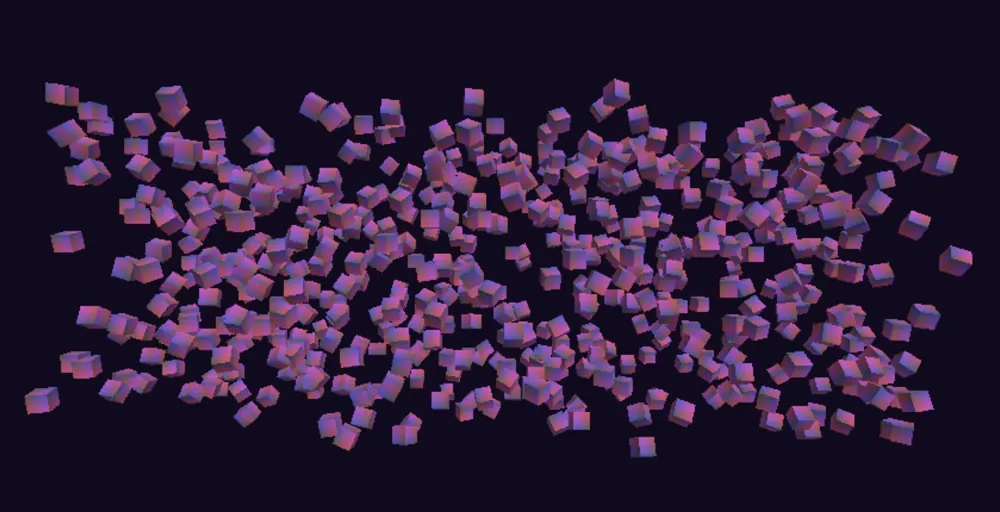
3D that never stops drawing
Six hundred cubes, each its own draw call, redrawn 86,100 times a second while nothing moved, and still drawing after it scrolled out of view. The rebuilt version draws once, with one call.
The test also showed what the audit missed. It skipped buttons with no type, never pressed links to #, and called sharp responsive images blurry. Those are fixed in the audit now.
What it checks
How it looks
Blurry and oversized images, canvases drawn below the screen's density, text cut off or sitting on other text, and pages that scroll sideways. Full-page screenshots at every width for a person to look over.
Whether it works
Every button and every # link is pressed once. Anything that changes nothing gets named. Plus page errors, failed requests, broken links and layout that jumps while it loads.
Who can use it
The axe accessibility rules, tap targets under 24 pixels, text under 11 pixels, missing alt text, heading order and pinch zoom.
How heavy it is
Page weight, files sent without compression, old image formats, code that never runs, scripts that block the first paint, blocking time on a phone slowed four times, and CPU used while nobody touches the page.
What the 3D costs
Draw calls and triangles per frame, texture sizes and graphics memory, drawing while idle and drawing while scrolled away. Works with any WebGL scene, three.js included.
Whether video survives the trip
Each video file's bit depth, colour range and bitrate, and whether the picture on screen matches the frame the browser decoded. A 3D texture or filter that turns dark scenes into blocks shows up here.
Whether it holds still on a tablet
A tablet browser's toolbar slides away as you scroll, so the window keeps changing height. The audit does the same and names any page block that resizes with it. A 3D view that resizes is cleared and flashes blank.
Whether its reviews hold up
Reads every page in the sitemap and lists testimonials signed by one name with different jobs or companies, or one quote signed by different people. Australian Consumer Law bans false testimonials, and buyers who check notice.
How it shows up in search and shares
Title and description length, canonical link, share image, favicon, robots.txt and sitemap.
What it can't judge
Taste, whether the words are true, whether the 3D is framed well and how it sounds. A tidy page can still say nothing. That part is still a person looking at every screenshot, which is the job I do for clients.
Want it run on your site, with the fixes done? Tell me about it.